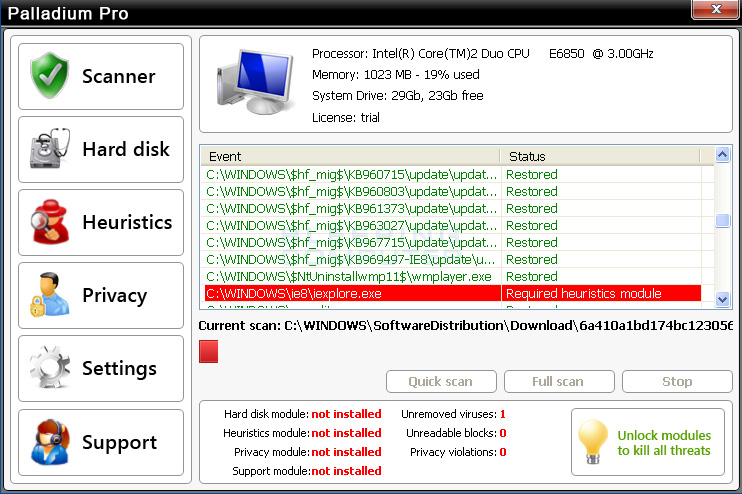
Palladium Pro is a fake rogue anti-spyware program from the
Fake
Microsoft Security Essentials family of infections. When this infection
is installed on your computer it will display a fake Microsoft Security Essentials
alert that states that it has detected an Unknown Win32/Trojan
on your computer. It will then prompt you to scan your computer, which will
start a fake scan of your computer that ultimately states that a file is infected
with Trojan.Horse.Win32.PAV.64.a. The text of these alerts
is:
Microsoft Security Essentials Alert
Potential Threat Details
Microsoft Security Essentials detected potential threats that might compromise
your private or damage your computer. Your access to these items may be suspended
until you take an action. Click ‘show details’ to learn more.
Microsoft Security Essentials Alert
Solution found
Microsoft Security Center has detected the submitted suspicious file as “Trojan.Horse.Win32.PAV.64.a”.
Threat level – very high.
Required action – Antivirus software is required to find and delete all traces
of the virus.
Click “Ok” to allow operation system to install the trial version
of Palladium to solve the problem.
System reboot is required to complete the installation.
It will then prompt you to install Palladium Pro in order to remove the virus.
When you press the OK button, to allow it to install, the infection will reboot
your computer to finish the installation.
When your computer reboot you will be shown the Palladium Pro start screen
instead of your normal Windows desktop. It then prompts you to scan your computer,
which will state that your computer is infected with numerous infections. It
will not, though, allow you to normally use the computer as the infection does
not all you to start the Windows desktop or the Windows task manager unless
you first purchase the program. In fact if you try to close the program it will
state that “Current settings don’t allow unprotected startup. Please check
your settings.”. As you can see this program is a scam that ransoms your
computer’s proper operation until you purchase it. It goes without saying that
you should not purchase this program for any reason.
The following guide will walk you through terminating the Palladium Pro process,
which will then allow you to start the Windows Desktop so that you can properly
remove this infection. For no reason should you purchase Palladium Pro, and
if you already have, you should contact your credit card company and dispute
the charges stating that the program is a computer infection. Finally, to remove
this infection and any related malware, please use the removal guide below.